
Introduction · Content
Introduction · Content
K-MAP USER GUIDE
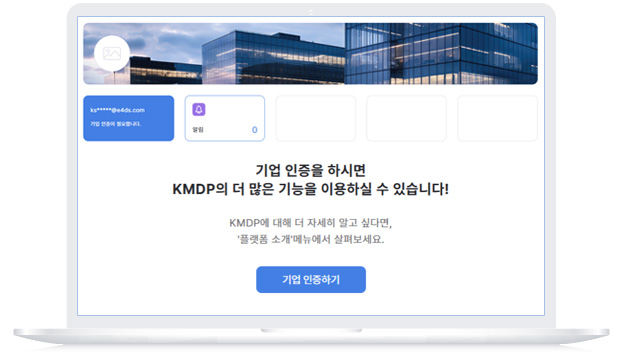
Get corporate authentication right now and try out more of K-MAP's features.
After logging in, if you complete manufacturing company authentication* through My Page - Company Verification,
you can use various functions of K-MAP as well as receive marketing and technical support benefits.
* When authenticating, you must submit your business registration certificate as an attachment.
K-MAP manufacturing companies are provided with benefits such as project matching with
demand companies as well as marketing and technical support.

Apply for Marketing Support
We introduce our technology through
manufacturing technology video production support.

Mfg. Member Benefits
We provide technical support through KITECH manufacturing experts.

Demand Company Find
We check the manufacturing request notice posted by the demand company and propose a quotation.

Project Management
Provides online project management function with matched demand companies.
Frequently Asked Questions
If the manufacturing company certification is not activated even though you are a manufacturing company, please leave an inquiry through the ‘Contact Us’ menu. (Or call 02-866-9913 and we will help you resolve the issue.)
Introduce your company's technology to potential customers by producing
a K-MAP manufacturing technology video.
The production team will visit the manufacturing plant to film and edit in the order you applied.
Fill out the manufacturing technology video production application form now.
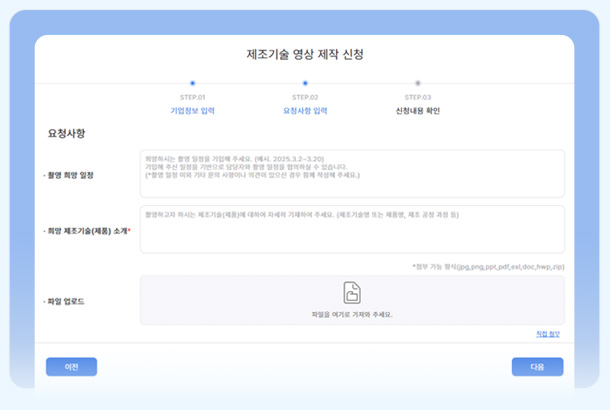
Application Form Write
Complete the application by filling out brief information such as contact information, desired filming schedule, and introduction of manufacturing technology.
The production team will check your application and contact you separately to confirm filming details.
Production example
We produce the video in the same manner as the format and upload the completed video to the Korea Institute of Industrial Technology's YouTube channel, K-MAP's corporate page, and K-MAP Omni Channel (SNS).
Frequently Asked Questions
However, in order to apply, you must first register as a member and be certified as a manufacturing company.
If you are a manufacturing company, please proceed with ‘Manufacturing Company Certification’ through [My Page > Company Certification].
If you are a company that has not received certification as a manufacturing company, please leave an inquiry through [Notifications/Inquiries > Contact Us].
In principle, filming is conducted at one location per day.(In situations where filming must be conducted in two locations, we support filming within short distances.)
The production format shows the manufacturing technology and process and provides the result by editing according to a preset format.
Get help from experts in various manufacturing stages
through K-MAP technical support.
If you leave a request for technical support,
a representative from the Korea Institute of Industrial Technology will check it and match you with a professional in the manufacturing field.
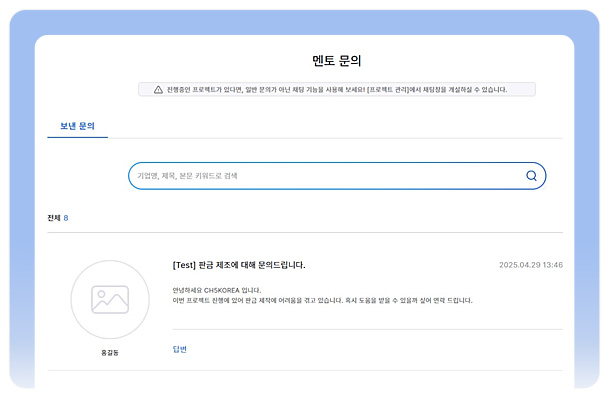
Contact Technical Support
If you leave an inquiry in the technical support category, a representative from the Korea Institute of Industrial Technology will check the information and match you with manufacturing experts.
We provide assistance in various stages of manufacturing.We provide support at all stages of manufacturing, including quotation - manufacturing - certification.

Consulting support at the quotation stage

Manufacturing sector technology development support

Project testing and certification
Frequently Asked Questions
Analysis and consulting support for quotation request specifications so that inquiries and quotation requests from demand companies can lead to contract conclusion - Short-term consulting to solve technical problems and R&D support for introducing new technologies to respond to demand companies' customized product production needs - If an order-production project conducted at K-MAP requires testing and certification of the product according to the needs of the demand company, we provide consulting support to connect with a professional testing and certification agency.
A representative from the Korea Institute of Industrial Technology will check your inquiry and application details and contact you individually, or match you with experts in the relevant field to support problem solving.
Check the manufacturing request notice from the demand company and
create a quote that meets the request and make a proposal.
In the Manufacturing Request Notice menu,
you can search and view manufacturing notices posted by companies in demand by selecting the keyword and entering a search term.
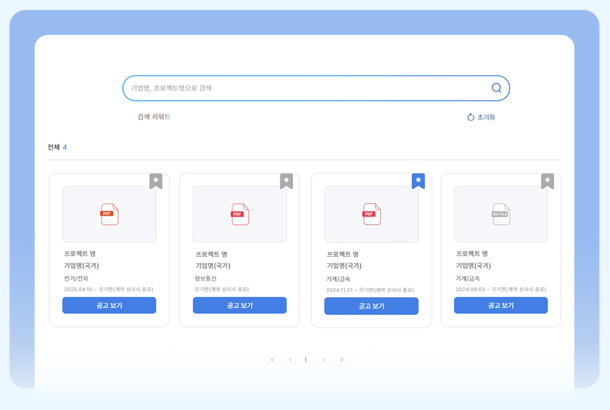
View notice
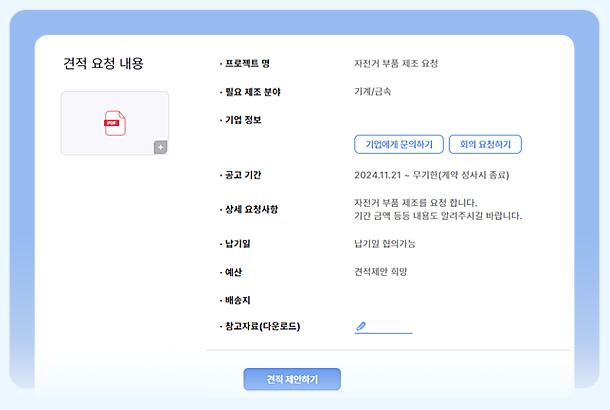
You can search and view manufacturing request announcements that match your manufacturing field and send a quote proposal to the appropriate project.
Contact the demand company
After a quotation proposal, you can confirm details and coordinate opinions about manufacturing with the demand company through chat and video conferencing.
Frequently Asked Questions
When contacting a demand company through a manufacturing request notice, you can inquire about the manufacturing request before sending the quotation and request a video conference if necessary.
Manage manufacturing projects
with demand companies online.
When a demand company requests a 1:1 quotation or checks the demand company's
manufacturing request announcement and sends a quotation,
a new project is created in the project menu.
Manage the manufacturing project by communicating with the demand company through Message - Chat - Videoconferencing.
Project Management
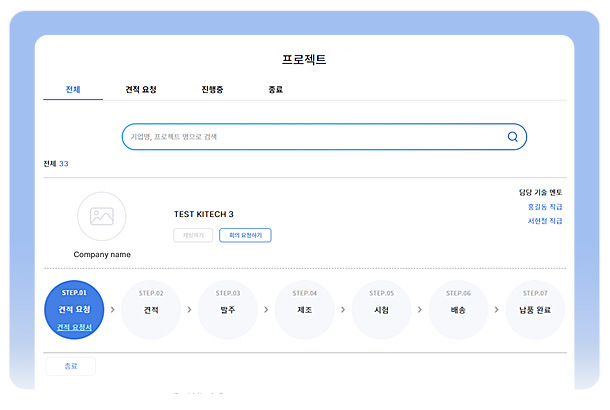
In the project management menu, you can check the progress stage (up to 7 steps from quotation request to completion of delivery) of all projects carried out with demand companies and manage projects online.
Frequently Asked Questions
In this menu, you can communicate with demand companies through messaging - chatting - video conferencing and manage your manufacturing project through seven steps: request for quotation > quotation > ordering > manufacturing > testing/certification > delivery > completion of delivery.